公開日 2026-1-12 更新日 -
前回、awffullにトラブルがあったことを報告して、 awstats に乗り換えたことは改めて書くことにしていました。一般的に必要になることではないのですが、一応書いておくことにします。
ポイントは、「awstats_buildstaticpages.pl を使ってスタティックなページを作る」です。
awstats はもともと稼働中のウェブサーバーに組み込んでブラウザからの操作でリアルタイムの統計をとるという機能がメインのようです。cgi経由で呼び出されるperlスクリプトが本体です。データはブラウザのログを読むわけですがログローテートで過去帳に移されていきますのでこれを確保しておく必要があります。そこでcronやlogrotateに入り込んでいます。確保の方法は確認していませんが、アクセス数の多いサイトだとなかなか大変なはずです。
私がやろうとしていることは、レンタルサーバーが提供している日毎のログをダウンロードしておいたものを、月ごとに統計をとるだけですから、awstats の稼働のための設定はほとんど不要ということになります。awstatのもともとの機能を知っていると、やらなくてもいい設定の見極めが早くなります。
ただし、普段使っているPCでapacheが稼働していて、localだけで機能しています。そのログの解析は不要ですし、cgiも動かしていません。この辺を混同してしまうと面倒なので注意です。localなapacheは、awstatで作成したページを静的に(つまりは普通のhtmlファイルとして)保存して、閲覧するだけです。
debianなので、aptにパッケージが用意されています。Debian13(Trixie)では、7.9-1が最新バージョンです。私はsynapticというパッケージマネージャで入れています。インストールというとaptコマンドで解説されることが多いですが、便利なのでいつもこれです。アップグレードもここからします。日本でメジャーなパッケージはsynapyicでの紹介が日本語でなされるようになってきました。
インストールすると、設定ファイルが/etc/awstats/と/etc/default/内に置かれます。 また、cron.d中とlogrotate.d中に自動的に呼び出されるスクリプトファイルが置かれます。
/etc/awstats/awstats.conf
/etc/awstats/awstats.conf.local
/etc/default/awstats
/etc/cron.d/awstats
/etc/logrotate.d/httpd-prerotate/awstats
まず、/etc/default/awstats です。#が行頭にあるのは解説です。AWSTATS_ENABLE_CRONTABS を "no" にしました。変更した所に自分の名前や、日付を入れると、変更したところを後から確認するのに便利なので習慣にしています。以下は変更後のファイルの内容をcatで表示したものです。
root@banach:~# cat /etc/default/awstats
# AWStats configuration options

# This variable controls the scheduling priority for updating AWStats
# datafiles and for generating static html reports.  Normal priority
# is 0 and a lower priority is 10.  See "man nice" for more info.
AWSTATS_NICE=10

# This variable controls whether to create static html reports every
# night in /var/cache/awstats/.  Set to "yes" or "no".
# To enable this you should also set AWSTATS_ENABLE_CRONTABS to "yes".
AWSTATS_ENABLE_BUILDSTATICPAGES="yes"

# This variable controls the language of all static html reports.  Set
# one to appropriate two-letter language code (default to en).
AWSTATS_LANG="en"

# This variable controls whether to run regular cron jobs for awstats.  Set
# to "yes" or "no" (default to "yes").
#AWSTATS_ENABLE_CRONTABS="yes"
# adachi
AWSTATS_ENABLE_CRONTABS="no"
cronで動くスクリプトと、logrotateで動くスクリプトが最初にこのファイルを確認して、"no"の場合はその先の作業を中断します。今回の目的では、cron.d中とlogrotate.d中のawstatsを削除してしまっても問題ありませんが、ここをnoにするだけでも無効になります。
AWSTATS_LANG は "jp" にすると出来上がるhtmlの表示が日本語になりますが、"en"のままの方がわかりやすいのでこのままにしておきます。お好みで。
awstats.confを awstats.dabiyone.conf という名前でコピーし、この中を書き換えます。dabiyoneの部分は、統計をとるサイトごとに区別する名前です。基本的に自分が区別できればよいのですが、記号が使えるかとか数字で始めるのは...とか面倒な事を言わずに英字文字列にします。awstats.conf.localを使う方法もあるようですが、今回は awstats.dabiyone.conf を作ります。
awstats.dabiyone.conf の変更箇所
LogFile="/media/adachi/S1T/dablogaws/dabiyone.com.log"	#(1)
LogFormat=1	#(2)
SiteDomain="dabiyone.com"	#(3)
HostAliases="localhost 127.0.0.1 www.dabiyone.com"	#(4)
DNSLookup=0	#(5)
DirData="/var/lib/awstats" #(6)
DirCgi="/usr/lib/cgi-bin"	#(7)
LoadPlugin="geoip GEOIP_STANDARD /usr/share/GeoIP/GeoIP.dat"	#(8)
(1)LogFile:awstatsに食わせるログファイルです。レンタルサーバーが提供している日毎のログをcatコマンドなどでまとめたものを、dabiyone.com.log として保存てからawstatsを呼び出すことにしたので、それをフルパスで指定しています。
(2)LogFormat:Apache combined log format にします。
(3)SiteDomain:統計をとるサイトのドメイン名
(4)HostAliases:refererに自ホストを入れてしまうと、refererが自ホストで埋まることが多いのでそれを避けるため。dabiyone.com は自動で含まれると判断したので、www付きを追加した。localhost 127.0.0.1 は予め書いてあった。
(5)DNSLookup:ログは普通ipアドレスで記録されるので、これをドメイン名にしたいときに選択する。国別の統計には役立たないので0にした。デフォルトはDNSキャッシュにあるときに限り利用するという2だが、今回の状況では役に立たない。
(6)DirData:統計データを書き溜めておく所。デフォルトはメインの処理スクリプトawstats.plのある/usr/lib/cgi-bin/だが、おすすめのように書いてあるのが、/var/lib/awstats。これに従う。
(7)DirCgi:デフォルトは /cgi-bin つまり DocumentRoot直下の /cgi-bin ディレクトリでそのままでもいいのかもしれないが、コマンドラインからの実行をするときには必要と書いてあったりするので、awstats.pl のあるところを指定した。
(8)Geo_IP:geoip関係の設定はいくつかあるが、そのうちのひとつを有効にした。/usr/share/GeoIP/GeoIP.dat は geoip-database パッケージでインストールされるが、すでに入っていた。awffullで入れていたパッケージである可能性が高い。
上記の(6)で設定した /var/lib/awstats/ のパーミッションでひっかかった。このフォルダはインストール時に作られるのか、cronが動いて作られたのか把握していないが、書き込みができないとエラーになったときには以下のような状態であった。
所有者、グループ共 www-data で、書き込み権限は所有者だけに許可されている。これはcgiで動く場合はこれでよい。
root@banach:~# ls -al /var/lib/awstats/
drwxr-x---  2 www-data www-data   4096 11月 23 19:10 .
drwxr-xr-x 57 root     root       4096 11月 19 13:48 ..
-rw-rw-r--  1 www-data www-data 143156 11月 23 19:10 awstats112025.dabiyone.txt
しかし、コマンドラインからの実行では、ユーザーadachiで動かすので、このままでは書き込めない。
いくつか方法があるが、ここではadachiをwww-dataグループに加えて、グループに書き込み権限を追加する。
awstats112025.dabiyone.txt というファイルがあるが、2025年11月分のログを集計したデータがテキストとして格納されている。ここに集計された最終日時以前のlogデータは二重集計を避けるために無視されるので、遡る場合はこのファイルを削除してやり直す必要がある。
最終的に、/var/lib/awstats/ は次のようになる。
root@banach:~# ls -al /var/lib/awstats/
drwxrwx---  2 www-data www-data   4096 11月 23 20:12 .
drwxr-xr-x 57 root     root       4096 11月 19 13:48 ..
geoipを動かすためにはもう一つ必要だった。synapticでgeoipで検索するとパッケージの候補がたくさん出てくる。awstatsはperlで書かれているので、libgeo-ip-perl あたりだろうとインストールすると動くようになった。
これに失敗しても、他の部分は統計がなされるので、じっくりと取り組むことができる。
出来上がったhtmlファイルの中にはたくさんの小さな画像(多くは14×14)が使われます。国、ブラウザ、OS、ファイルの種類などのアイコンです。また、グラフも小さな画像を拡大表示することで作っています。debianでは、/usr/share/awstats/icon/ にインストールされますが、htmlファイルの中では src="/awstats-icon/... で指定されます。
ファイルそのものをコピーしても良いし、リンクを使ってもいいのですが、apacheの機能を使うのが一番スマートです。
もちろん、apacheが動いているというのが前提です。もともとローカルで写真や文書の管理をし、PHPでtodoや住所録の管理をしているので、これに組み込むわけです。
(1)/etc/apache2/conf-available/awstats.conf を次の内容でつくります。
Alias /awstats-icon "/usr/share/awstats/icon/"
cgiを使うためにも使えますが、今回の目的には不要なので、この1行だけです。
(2)awstats.confを有効にする
マニュアル的には
root@banach:~# a2enconf awstats
なのだけれど、いつもconf-availableとconf-enabledの中を眺めて、作業してしまう。
root@banach:~# ln -s /etc/apache2/conf-available/awstats.conf /etc/apache2/conf-enabled/awstats.conf
apacheを再起動する。今回の内容では reload でもいいらしい。
root@banach:~# systemctl restart apache2
当然のことながら、http://〜 でアクセスする必要がある。files:///〜 ではAliasが有効にならない。files:///〜 で使うなら、ファイルそのものをコピーしてしまうか、シンボリックリンクを使って /awstats-icon でアクセスできるようにiconファイル達を配置します。
awstats.dabiyone.conf に LogFile="/media/adachi/S1T/dablogaws/dabiyone.com.log" と書いたので(設定ファイルその2)、/media/adachi/S1T/dablogaws/ で作業します。隣のフォルダ ../dablog/ に dabiyone.com のサイトを始めた頃のログが残っているので、そこからログの一部をとって集計させてみます。作成したbashスクリプトは awstatic0 です。
zcat ../dablog/dabiyone.com_201807??.log.gz >dabiyone.com.log
perl /usr/share/awstats/tools/awstats_buildstaticpages.pl\
 -config=dabiyone -update\
 -awstatsprog=/usr/lib/cgi-bin/awstats.pl\
 -dir=/var/www/awstats -month=07 -year=2018 -builddate=201807
zcat で gzファイルを解凍して連結し、dabiyone.com.logにまとめます。201807??は、201807の後ろに任意の二文字あるものすべてを指します。
行末の\はその次の改行を無視させるシェルスクリプトの決まりで、本来一行に書くべきものを分割したいときに使う書き方です。
awstats_buildstaticpages.pl はawstatsで静的ページを作るコマンドです。-config=dabiyone は、awstats.dabiyone.conf を使う指示。
-updateはlogファイルを解析して/var/lib/awstatsのファイル群に結果を保存することのようです。
-awstatsprog は awstats.pl の存在場所と名前です。どうやら awstats.pl を使って色々なページを構築するのが awstats_buildstaticpages.pl の仕事のようです。
-dirは結果のページ群をどこに保存するかという指示。以下は処理データの年月と、ファイル名に使う年月の表記です。
次のような、出力をしながらページを保存します。
adachi@banach:/media/adachi/S1T/dablogaws$ ./awstatic0
Launch update process : "/usr/lib/cgi-bin/awstats.pl" -config=dabiyone -update -configdir=
Build main page: "/usr/lib/cgi-bin/awstats.pl" -config=dabiyone -staticlinks=awstats.dabiyone.201807 -month=07 -year=2018 -output
Build alldomains page: "/usr/lib/cgi-bin/awstats.pl" -config=dabiyone -staticlinks=awstats.dabiyone.201807 -month=07 -year=2018 -output=alldomains
Build allhosts page: "/usr/lib/cgi-bin/awstats.pl" -config=dabiyone -staticlinks=awstats.dabiyone.201807 -month=07 -year=2018 -output=allhosts
Build lasthosts page: "/usr/lib/cgi-bin/awstats.pl" -config=dabiyone -staticlinks=awstats.dabiyone.201807 -month=07 -year=2018 -output=lasthosts
Build unknownip page: "/usr/lib/cgi-bin/awstats.pl" -config=dabiyone -staticlinks=awstats.dabiyone.201807 -month=07 -year=2018 -output=unknownip
Build allrobots page: "/usr/lib/cgi-bin/awstats.pl" -config=dabiyone -staticlinks=awstats.dabiyone.201807 -month=07 -year=2018 -output=allrobots
Build lastrobots page: "/usr/lib/cgi-bin/awstats.pl" -config=dabiyone -staticlinks=awstats.dabiyone.201807 -month=07 -year=2018 -output=lastrobots
Build session page: "/usr/lib/cgi-bin/awstats.pl" -config=dabiyone -staticlinks=awstats.dabiyone.201807 -month=07 -year=2018 -output=session
Build urldetail page: "/usr/lib/cgi-bin/awstats.pl" -config=dabiyone -staticlinks=awstats.dabiyone.201807 -month=07 -year=2018 -output=urldetail
Build urlentry page: "/usr/lib/cgi-bin/awstats.pl" -config=dabiyone -staticlinks=awstats.dabiyone.201807 -month=07 -year=2018 -output=urlentry
Build urlexit page: "/usr/lib/cgi-bin/awstats.pl" -config=dabiyone -staticlinks=awstats.dabiyone.201807 -month=07 -year=2018 -output=urlexit
Build osdetail page: "/usr/lib/cgi-bin/awstats.pl" -config=dabiyone -staticlinks=awstats.dabiyone.201807 -month=07 -year=2018 -output=osdetail
Build unknownos page: "/usr/lib/cgi-bin/awstats.pl" -config=dabiyone -staticlinks=awstats.dabiyone.201807 -month=07 -year=2018 -output=unknownos
Build browserdetail page: "/usr/lib/cgi-bin/awstats.pl" -config=dabiyone -staticlinks=awstats.dabiyone.201807 -month=07 -year=2018 -output=browserdetail
Build unknownbrowser page: "/usr/lib/cgi-bin/awstats.pl" -config=dabiyone -staticlinks=awstats.dabiyone.201807 -month=07 -year=2018 -output=unknownbrowser
Build downloads page: "/usr/lib/cgi-bin/awstats.pl" -config=dabiyone -staticlinks=awstats.dabiyone.201807 -month=07 -year=2018 -output=downloads
Build refererse page: "/usr/lib/cgi-bin/awstats.pl" -config=dabiyone -staticlinks=awstats.dabiyone.201807 -month=07 -year=2018 -output=refererse
Build refererpages page: "/usr/lib/cgi-bin/awstats.pl" -config=dabiyone -staticlinks=awstats.dabiyone.201807 -month=07 -year=2018 -output=refererpages
Build keyphrases page: "/usr/lib/cgi-bin/awstats.pl" -config=dabiyone -staticlinks=awstats.dabiyone.201807 -month=07 -year=2018 -output=keyphrases
Build keywords page: "/usr/lib/cgi-bin/awstats.pl" -config=dabiyone -staticlinks=awstats.dabiyone.201807 -month=07 -year=2018 -output=keywords
Build errors400 page: "/usr/lib/cgi-bin/awstats.pl" -config=dabiyone -staticlinks=awstats.dabiyone.201807 -month=07 -year=2018 -output=errors400
Build errors403 page: "/usr/lib/cgi-bin/awstats.pl" -config=dabiyone -staticlinks=awstats.dabiyone.201807 -month=07 -year=2018 -output=errors403
Build errors404 page: "/usr/lib/cgi-bin/awstats.pl" -config=dabiyone -staticlinks=awstats.dabiyone.201807 -month=07 -year=2018 -output=errors404
23 files built.
Main HTML page is 'awstats.dabiyone.201807.html'.
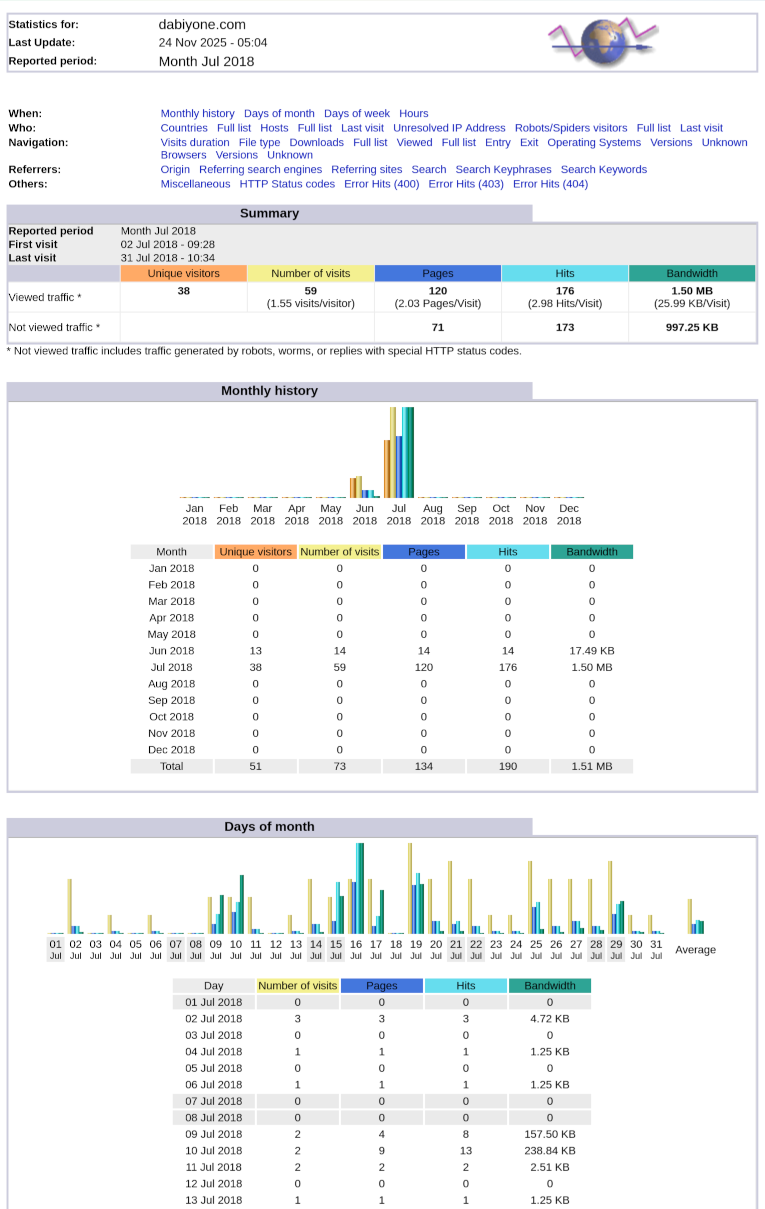
ブラウザでこの "Main HTML page" を表示すると次のようになります。その他のページはこのページからリンクされている詳細ページです。
グラフは、 のように縦に1pxしかない小さな画像を、heightを指定することで のように縦方向だけ大きくしてグラフにしています。
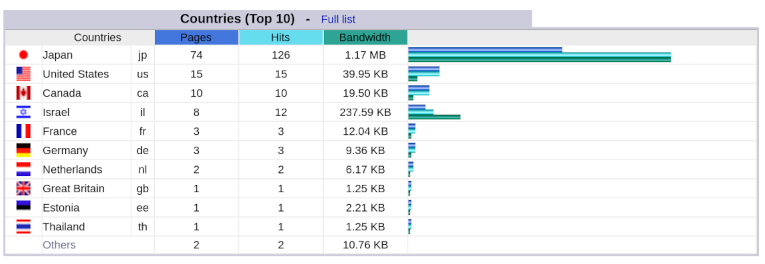
geoipが動いていることは、Countriesの項目を見ればわかります。"Full list" が詳細ページへのリンクです。
動くようになったので、bashスクリプトを改良しておきます。
年と月の値を変数にして一箇所の変更で済むようにしました。
-configdir= の値を加えました。(必要ないのですが、-configdir= と毎回報告されるので、-configdir=/etc/awstats と報告されるようにしたというだけ)
/usr/lib/cgi-bin/や/var/www/awstatsもここに書くのならば、awstats.dabiyone.conf へ書かなくても良かったのかとも思いますが、確かめていません。
月ごとの報告が作られるわけですが、年,月を選択する目次が必要なので、index.htmlを作ることにし、リンクをスクリプト内で追加するようにechoの行を加えました。同じ月に何度も集計するとダブりますが、それほど頻繁にやりませんので、後で考えます。
#!/bin/bash
year=2025
month=12
yyyymm=$year$month
zcat ../dablog/dabiyone.com_$yyyymm??.log.gz >dabiyone.com.log
perl /usr/share/awstats/tools/awstats_buildstaticpages.pl\
  -configdir=/etc/awstats -config=dabiyone -update\
  -awstatsprog=/usr/lib/cgi-bin/awstats.pl\
  -dir=/var/www/awstats -month=$month -year=$year -builddate=$yyyymm
echo "<p><a href=\"awstats.dabiyone.$yyyymm.html\">$yyyymm</a></p>"\
  >>/var/www/awstats/index.html
作成中のコマンド出力は同じですが、-configdir=/etc/awstats と出ているところだけ違います。
adachi@banach:/media/adachi/S1T/dablogaws$ ./buildstatic
Launch update process : "/usr/lib/cgi-bin/awstats.pl" -config=dabiyone -update -configdir=/etc/awstats
Build main page: "/usr/lib/cgi-bin/awstats.pl" -config=dabiyone -staticlinks=awstats.dabiyone.202512 -configdir=/etc/awstats -month=12 -year=2025 -output
Build alldomains page: "/usr/lib/cgi-bin/awstats.pl" -config=dabiyone -staticlinks=awstats.dabiyone.202512 -configdir=/etc/awstats -month=12 -year=2025 -output=alldomains
Build allhosts page: "/usr/lib/cgi-bin/awstats.pl" -config=dabiyone -staticlinks=awstats.dabiyone.202512 -configdir=/etc/awstats -month=12 -year=2025 -output=allhosts
....以下略....
2025年の1月から9月の、月ごとの集計で比較してみます。9月までなのは10月からDebian13に乗り換えてawffullの不具合が出ているからです。実は元のDebian11も起動時に選択でき、そちらのawffullは今まで通り使えることは確認できているのですが、再起動は面倒ですので。
サイト、Volume、訪問者などの集計方針は微妙に違うらしいのですが、ほぼ対応するものを並べて比較しています。
awstatsの方がかなり少なくなっていますが、RobotやSpiderのようなものを、実際には閲覧されていないとして計数していないというのが主な理由のようです。awffullでは国別の集計で日本よりも USが常に上位。加えてアイルランド, France, UK, ロシアなどが代わる代わる上位になる状態でした。awstats は概ね日本が最上位でUSがhitsで1/4程度が普通ですから、正当な評価になっていると感じます。
| awffull | ||||||
|---|---|---|---|---|---|---|
| 年月 | サイト | Volume | 訪問者 | ページ | ファイル | ヒット |
| 2025 09 | 4094 | 1.84 GB | 4829 | 32520 | 36836 | 52739 |
| 2025 08 | 3454 | 921.06 MB | 4838 | 33755 | 17470 | 47394 |
| 2025 07 | 4314 | 891.80 MB | 5549 | 41696 | 17529 | 56818 |
| 2025 06 | 3224 | 658.11 MB | 4621 | 21044 | 16387 | 33633 |
| 2025 05 | 3235 | 631.90 MB | 4893 | 13959 | 16279 | 27091 |
| 2025 04 | 2997 | 430.34 MB | 4744 | 13535 | 14977 | 24624 |
| 2025 03 | 3161 | 536.64 MB | 5767 | 15530 | 18900 | 32553 |
| 2025 02 | 3187 | 936.36 MB | 5457 | 14628 | 21194 | 29567 |
| 2025 01 | 2991 | 432.60 MB | 5531 | 14274 | 16160 | 25571 |
| awstats | ||||||
| 年月 | uniqv | bandwidth | visits | pages | hits | |
| 2025 09 | 1743 | 1.39 GB | 2771 | 15983 | 30097 | |
| 2025 08 | 1701 | 496.77 MB | 2797 | 4233 | 12296 | |
| 2025 07 | 1686 | 381.35 MB | 2854 | 3609 | 11543 | |
| 2025 06 | 1586 | 277.16 MB | 2708 | 3900 | 10389 | |
| 2025 05 | 1736 | 245.52 MB | 3086 | 3869 | 10552 | |
| 2025 04 | 1461 | 268.09 MB | 2722 | 3865 | 10776 | |
| 2025 03 | 1516 | 309.22 MB | 2527 | 2976 | 10271 | |
| 2025 02 | 1679 | 255.23 MB | 2549 | 4407 | 10602 | |
| 2025 01 | 1140 | 243.09 MB | 2002 | 2686 | 10063 | |
ほぼ対応するものを縦に揃えています。色はそれぞれのソフト固有の配色です。
(A)https://nathangrigg.com/2011/12/installing-awstats/:Installing AWStats and using it to build static statistic pages (Nathan Grigg)
(B)https://www.g-loaded.eu/2005/12/04/configure-awstats/:A quick AWstats guide (G-Loaded Journal)
(c)https://www.perfectsky.net/awstats/:AWStats (perfectsky)
前項まででawstatsの作業は終わりです。Awffullに比べてただ一つの不満部分を補ったお話です。
awstatsのststicな統計は月ごとが基本で、各月の最初に "Monthly history" としてその年の推移を示しますが、毎年1月に新しい記録を作り始めますから、前の年との比較が面倒です。
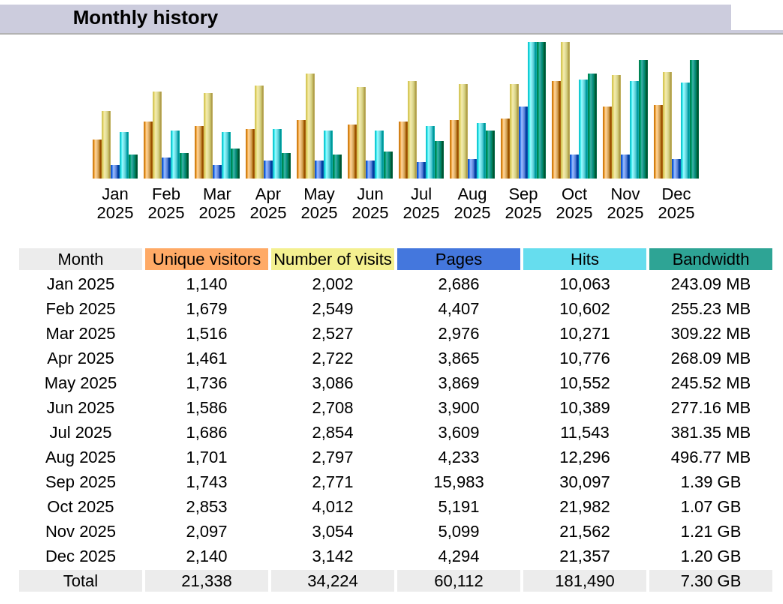
awstatsの1月から12月までの集計部分
Awffullでは最近の12ヶ月の変化をグラフにするのがデフォルトですが、期間を拡大することができますので、2018年からの全部の履歴をグラフにしていました。大したことではありませんが、awstatsの月選択ページにこの機能をもたせることにしました。phpを使います。
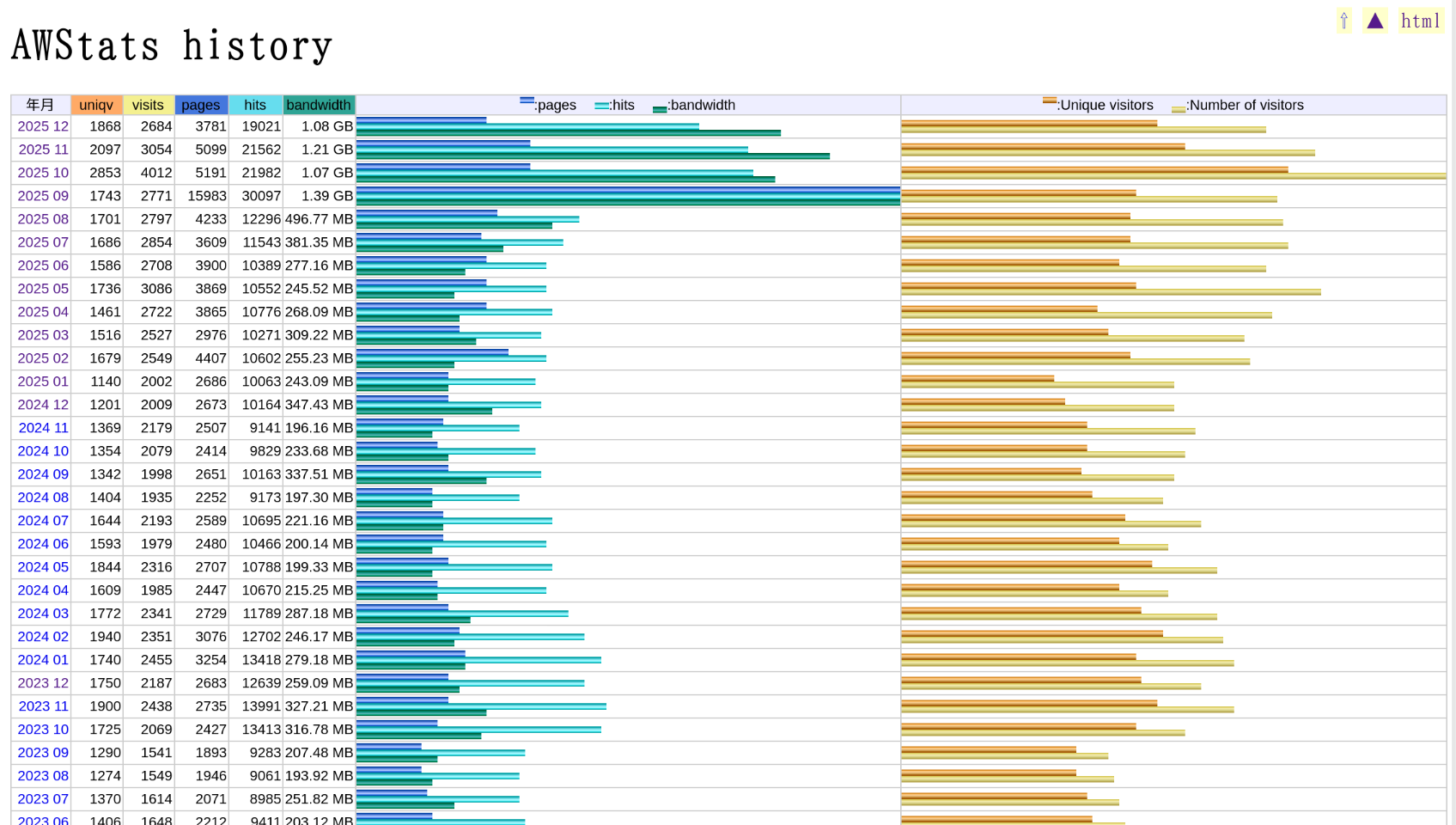
PHPで作る年をまたぐ統計(一部)
(1)awstatsの各年12月の "Monthly history" の数値部分をコピーして2018年から2025年の月ごとの一覧をファイルにします。
#Month	Uniquevisitors	Numberofvisits	Pages	Hits	Bandwidth
Jun 2018	13	14	14	14	17.49 KB
Jul 2018	38	59	120	176	1.50 MB
Aug 2018	40	86	178	222	2.05 MB
Sep 2018	36	84	113	137	1.24 MB
Oct 2018	28	57	110	130	1.21 MB
Nov 2018	23	37	160	253	4.04 MB
Dec 2018	54	96	242	475	10.10 MB
Total	232	433	937	1,407	20.15 MB
Jan 2019	73	132	446	1,284	199.34 MB
Feb 2019	94	150	218	366	4.80 MB
...略....
Jun 2025	1,586	2,708	3,900	10,389	277.16 MB
Jul 2025	1,686	2,854	3,609	11,543	381.35 MB
Aug 2025	1,701	2,797	4,233	12,296	496.77 MB
Sep 2025	1,743	2,771	15,983	30,097	1.39 GB
Oct 2025	2,853	4,012	5,191	21,982	1.07 GB
Nov 2025	2,097	3,054	5,099	21,562	1.21 GB
Dec 2025	1,868	2,684	3,781	19,021	1.08 GB
Total	21,066	33,766	59,599	179,154	7.18 GB
#で始まる行や空行、Totalで始まる行は無視します。awstatsが作るhtmlファイルから取り出すこともできますが、今のところ新しい月の集計が加わったときに1行追加するだけですから、手動にします。なるべく手間を省くために、ページの表記のままコピーします。月の順、月は英語名、千の区切りやMB,GBの単位もそのままでかまいません。項目の区切りはそのままでタブ区切りですが、月と年、MB,GBの前はスペースになります。すべてPHPプログラムの中で対処します。
(2)ここからPHPのプログラムの概要です。(1)で用意したファイルは小さいので、一気に読んで行ごとのリストにし、逆順にします。
$wholefile = file_get_contents("zhistory.txt");
$lines = explode("\n", $wholefile);
$revlines = array_reverse($lines);
(3)foreachを使って全行にわたり処理を行います。まず、#で始まる行や空行、Totalで始まる行は無視し、タブ区切りで項目に分けます。
foreach($revlines as $line) {
	if (empty($line) or str_starts_with($line,'#')) continue;
	if (str_starts_with($line,'Total')) continue;
	list($monthyear,$uniqv,$numv,$pages,$hits,$bandw) = explode("\t",$line);
(4)それぞれの項目を加工して、それぞれのリストにします。まず第一項目は月と年をスペースで区切り、年を$yearsls[$ct]に、"Jun"などの月名を予め作っておいた辞書を使って "06"などと変換し、$monthls[$ct] に格納します。lsをつけることでlistであることがわかるようにしています。$ctは有効な行を数えるカウンタです。
	list($monthstr,$yearls[$ct]) = explode(' ',$monthyear);
	$monthls[$ct] = $months[$monthstr];
(5)UniquevisitorsからHitsまでは千の区切りが入ることがありますので、str_replace()関数で取り除きます。
	$uniqvls[$ct] = str_replace(',', '',$uniqv);
	$numvls[$ct]  = str_replace(',', '',$numv);
	$pagesls[$ct] = str_replace(',', '',$pages);
	$hitsls[$ct]  = str_replace(',', '',$hits);
(6)Bandwidthはスペースを区切りに数値と単位に分け、floatval()関数で数値を小数点のある数値に変換し、単位部分を予め作っておいた辞書を使って、'MB'=>1000000 のような変換をして数値に掛けます。
	$jousuu = 1;
	if(str_contains($bandw,' ')) list($frac,$pref) = explode(' ',$bandw); #prefix
	$jousuu = $KMGT[$pref];
	$bandwls[$ct] = floatval($frac) * $jousuu; #=doubleval()
	$bandwKMGls[$ct] = str_replace(' ', "\u{00A0}",$bandw);
最後の行はMB,GBにもどすのが面倒なので表示用に元の文字列を記録しておくのですが、スペースで改行されるのを防止するために、スペースを改行されないスペースに置換しています。これは後で年と月の間のスペースにもつかいますが、そのときには" "です。
(7)各数値の最大値を求めます。PHPには便利なmax()関数があります。グラフを描く時の最大値をどれぐらいの長さにするかを決めるためです。
$maxuniqv = max($uniqvls);
$maxnumv =  max($numvls);
$maxpages = max($pagesls);
$maxhits = max($hitsls);
$maxbandw = max($bandwls);
(8)tableタグを使って数値とグラフを書いていきます。最初の部分(th)は省略して本体部分。$uniqvls[$i]などをprint内にかくと色々面倒で、echoと,で書くのが改変時の視認性もよいという結論でこのようになっています。
for ($i=1;$i<$ct;$i++){
	print "<tr>\n";
	echo '<td><a href="awstats.dabiyone.',$yearls[$i],$monthls[$i],'.html">',$yearls[$i]," ",$monthls[$i],'</a></td>';
	echo '<td>',$uniqvls[$i],'</td><td>',$numvls[$i],'</td>';
	echo '<td>',$pagesls[$i],'</td><td>',$hitsls[$i],'</td><td>',$bandwKMGls[$i],'</td><td class="aws">';
(9)グラフ部分。pages,hits,bandwidth部分です。高さ13px,幅1pxの画像の幅を指定することで拡大し、グラフにします。
awstatsオリジナルではWidth,height属性で単位なし(=ピクセル単位)で指定しています。ここではstyle属性を使い、widthは%単位で指定することにしました。widthの100%指定は、その要素が使える幅をいっぱいに使う指定になりますから、td要素の幅を指定することで、グラフ全体の幅を簡単に調整できること、tableやtdも幅を%で指定すればブラウザのウインドウの幅の変更に合わせてグラフが伸縮されるので極めて都合が良いのです。
	$p=(round($pagesls[$i]*100/$maxpages));
	$h=(round($hitsls[$i]*100/$maxhits));
	$k=(round($bandwls[$i]*100/$maxbandw));
	echo '<img src="/awstats-icon/other/hp.png" style="width:',$p,'%; height:5px;" alt=""><br>';
	echo '<img src="/awstats-icon/other/hh.png" style="width:',$h,'%; height:5px;" alt=""><br>';
	echo '<img src="/awstats-icon/other/hk.png" style="width:',$k,'%; height:5px;" alt="">';
	echo '</td><td class="aws">',"\n";
ちなみにstyle属性で指定するのにはもう一つ理由があります。スタイルシートで height:auto; を一度でも指定すると、これを無効化できないのです。もちろん、height:5px; などで上書きはできるのですが、Width,height属性で画像の縦横比が変わるような指定ができません(firefoxのみでの現象かもしれません)。awstatsのhtmlは "HTML 4.01 Transitional"なので、この制約はないようです。
(10)全体のスタイルシートにもちょっとコツがあります。
グラフを2つに分けましたので、38%ずつで、他が合わせて24%となります。table自体の大きさはdiv.graphへの指定で決めます。
.graph table{
  width:100%;
}
td.aws{
  width:38%;
}
tdのheightはfontを小さくしてもline-heightを考慮して大きくなってしまいますので、これも指定します。特にグラフの画像も行扱いになるので3本入れるには、画像の高さを5pxにするだけでなく、line-heightも5pxにしないと、上下の棒に隙間ができてtdの高さが小さくなりません。
td{
  border:solid #CCC 1px;
  font: 11px  verdana, arial, helvetica, sans-serif;
  text-align:right;
  color: #000000;
  line-height: 11px;
  padding: 1px;
  width:8ex;
}
td.aws{
  border:solid #CCC 1px;
  font: 5px , sans-serif;
  line-height: 5px;
  text-align:left;
  color: #000000;
  padding: 1px 0px;
}